How to Bypass Activation Lock on iPhone and iPad
- Why Activation Lock Bypass?
- How is Activation Lock Bypass Possible?
- Step-by-Step User Guide
- Click here if you don`t want to read the whole article
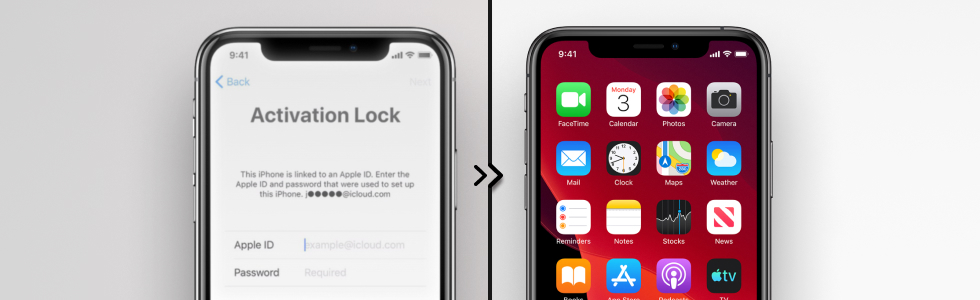
iRemove Tool is a perfect solution for users whose iOS devices are stuck on the iCloud Lock screen. This software tool allows you to get all iOS features and device functions back in one click.
Compatible Firmware
- from iOS 12.0 through iOS 26
Compatible iPhone models
- iPhone 5S through iPhone 16 Pro Max
Compatible iPad models
- from 2012 to 2025 iPad releases
Reasons for Activation Lock Bypass
The significant number of new devices released yearly makes many people think more about recycling and giving a second life to used gadgets. It is a reason for the high amount of second-hand iPhones and iPads sold by individual sellers.
Still, getting a used device from another person is risky because it can arrive with an Activation Lock screen. It will ask for login and password from the iCloud account of the original iPhone or iPad owner who turned on the Find My app. This app automatically enables the iCloud Activation Lock security measure.
You cannot use the smartphone or tablet without knowing the login credentials. All the features are locked until you enter the correct information or bypass the Activation Lock using iRemove tools.
These are the main reasons for removing the iCloud Lock screen:
- give a second life to a used gadget;
- get access to the device functions;
- use all iOS features;
- make phone calls;
- connect to the Internet;
- sign in with your Apple ID.
How is iCloud Activation Lock bypass possible?
Anyone who gets a second-hand iPhone 5S through iPhone 16 Pro Max or iPad 2 through iPad Pro with an Activation Lock can bypass the locked screen and get full access to all device functions. It is a fast and straightforward fix offered by iRemove services.
The bypassing tool supports a significant number of devices running iOS 12.0 through iOS 26:
- iPhone 5S
- iPhone 6S / 6S Plus
- iPhone 7 / 7 Plus
- iPhone 8 / 8 Plus
- iPhone X / XR / XS / XS Max
- iPhone 11 / 11 Pro / 11 Pro Max
- iPhone 12 / 12 Mini / 12 Pro / 12 Pro Max
- iPhone 13 / 13 Mini / 13 Pro / 13 Pro Max
- iPhone 14 / 14 Plus / 14 Pro / 14 Pro Max
- iPhone 15 / 15 Plus / 15 Pro / 15 Pro Max
- iPhone 16 / 16 Plus / 16 Pro / 16 Pro Max / 16e
- iPhone SE (2nd gen / 3rd gen)
- iPad Pro M4 13"
- iPad Pro M4 11"
- iPad Air M2 13"
- iPad Pro 12.9" 6th Gen
- iPad Pro 11" 4rd Gen
- iPad Air 5th Gen
- iPad Pro 12.9" 5th Gen
- iPad Pro 11" 3rd Gen
- iPad 10.9" 10th Gen
- iPad Mini 6th Gen
- iPad 10.2" 9th Gen
- iPad Air 4th Gen
- iPad 10.2" 8th Gen
- iPad Pro 12.9" 4th Gen
- iPad Pro 11" 2nd Gen
- iPad Mini 5th Gen
- iPad Air 3rd Gen
- iPad Pro 11"
- iPad Pro 12.9" 3rd Gen
The services are not available for any blacklisted or stolen devices.
Step-by-Step User Guide for Bypassing Activation Lock on iPhone and iPad
One-click services are easy to use because they require no knowledge on your side. iRemove iCloud Bypass Tools are compatible with Windows and Mac computers. Here is how to order iRemove Tool services on the gsmserver website.
- Check your phone first!
For this, connect your phone to the computer and run iRemove Tool software. Download Software
If the software verifies that your phone is compatible, you can proceed with the following steps. - While placing your order, indicate the IMEI of your iPhone / iPad. Where to find IMEI?
- When we process your order, you will receive a notification to your email with detailed instructions.
Why iRemove? A Brief Summary
So, iRemove Tool is a user-friendly one-click software solution for iCloud Activation Lock bypassing with many benefits. It works for many iPhone and iPad models. You need only a couple of minutes to run the service and successfully remove the locked screen, getting full access to your device.
These are the benefits to enjoy:
- iRemove Tools have a high reputation on the market, ranked #1 service under the "Cell Phone Recycling and Decoding Service" category on Trustpilot;
- this tool is intuitive, friendly, and super easy to use;
- software is updated frequently, ensuring you can use it on the most recent iOS versions;
- friendly customer service and full support;
- multi-language instructions for more straightforward usage of the software in the language of your choice.
Interested? For more information about iRemove products, purchasing, and cooperation, please write in our sales chat.
