Smartphone Firmware Deep Dive
A light technical guide to firmware types, version architecture, and naming conventions across Samsung, Xiaomi, Huawei, and iOS — written for beginner technicians who are rising specialsts and want to find a simple guide on how to choose the right firmware.
- What Is Firmware? Core Concepts
- Firmware Types & Specifications
- Samsung Firmware — Full Breakdown
- Xiaomi / MIUI / HyperOS — Full Breakdown
- Huawei / EMUI / HarmonyOS — Full Breakdown
- iPhone / iOS — Full Breakdown
- Before Doing Anything - Checklist
What Is Firmware? Core Concepts
Firmware is the permanent software embedded into a device's non-volatile memory (storage, eMMC, UFS) that controls all low-level hardware operations. Unlike applications that run on top of an operating system, firmware locates between the hardware and the OS — it is the first code that executes at power-on and validates every subsequent step in the boot chain.
For mobile repair technicians, understanding firmware is critical: it governs bootloader security, determines downgrade eligibility, controls baseband (modem), and defines regional radio frequency compliance profiles. Using incorrect firmware is one of the most common causes of permanently bricked or no-network devices in the field of mobile repair.
Firmware is not the same as the ROM or the operating system, though the terms are often used interchangeably. In the correct repair terminology: firmware = the entire image — bootloader + modem + system + vendor partitions. The "OS" (Android / iOS) is just one partition within that image.
Key Components Inside a Firmware Package
| Partition / Component | Function | Can be written separately? |
| Bootloader (BL) | First-stage boot, hardware init, secure boot chain validation | Yes |
| Baseband / Modem (CP) | GSM/LTE/5G radio stack, SIM comms, RF compliance | Yes |
| System / AP | Android OS image, framework, apps | Yes |
| Vendor / ODM | Manufacturer HALs, proprietary drivers | Usually bundled with AP |
| CSC / Regional Data | APN, language pack, carrier branding, regional app bundles | Yes |
| Recovery | Update/restore partition, used for sideloading OTA packages | Yes |
| Kernel (boot.img) | Linux kernel, device tree, boot ramdisk | Yes (Samsung, Xiaomi, OnePlus) |
Firmware Types & Specifications
Every manufacturer distributes firmware in several distinct formats. Knowing which type to use is crucial for a technician.
| Stock / OEM Firmware | Fastboot ROM | Recovery ROM / OTA Package |
| Official, unmodified firmware from the manufacturer. Manufacturer-signed bootloaders, passes all hardware attestation. The baseline for any professional repair. [Official] |
Complete partition-by-partition image written via Fastboot (Xiaomi) or Odin (Samsung). Always wipes all partitions. Required for dead-boot recovery and region changes. [Full Wipe] |
Differential or full update written via built-in Recovery. Preserves user data. Cannot change regions. Used for system updates on normally booting devices. [Data Safe] |
| Modem / Baseband Firmware | EDL / Download Mode Firmware | Custom ROM |
| Controls all radio communications. Critical for 5G/LTE/VoLTE and regional frequency compliance. Mismatched modem = no signal or regulatory violation. [RF Critical] |
Emergency Download Mode — used when the bootloader is damaged. Requires tooling: Qualcomm QFIL (Xiaomi/Qualcomm), Samsung Odin, Huawei HiDownload. [Emergency] |
Third-party builds (LineageOS, crDroid). Not for professional repair — voids warranty, may trip Knox/eFuses. [Unofficial] |
Critical Repair Rule
Never write a Fastboot ROM when a Recovery ROM is sufficient. Fastboot wipes user data and resets the binary counter — affecting Knox status on Samsung and anti-rollback protection on Xiaomi/Huawei.
Samsung Firmware — Full breakdown
Samsung uses a standardized alphanumeric firmware string visible in Settings → About Phone → Software Information or via *#1234#. This string encodes the device model, regional/carrier identity, binary version, and build date — all critical for safe writing process. Probably the most easy to understand firmware codification format.
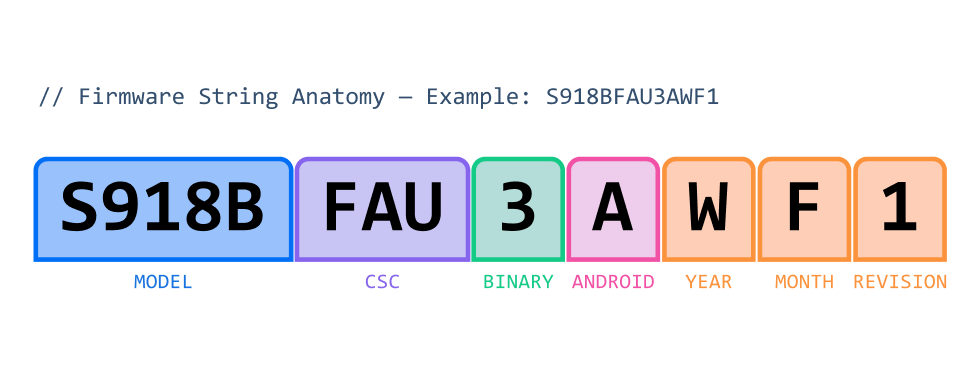
| S918B — Model Number | FAU — CSC Code | 3 — Binary Number |
| S = Galaxy S series · 918 = model code (Galaxy S23 Ultra) · B = International/Global hardware. Other suffixes: U (US not tied to a specific network provider), N (Korea). | Consumer Software Customization — 3-letter region/carrier identifier. Determines APN settings, pre-installed apps, language pack, and OTA update server assignment. | Bootloader binary security level. Increments with each security patch that modifies the binary (not always increments +1, may jump 2-3 numbers). Using lower binary version means downgrade. |
| A — Android Version Indicator | W — Build Year | F — Build Month |
| On newer models, signals the major Android OS generation: A = Android 13 base · B = Android 14 · C = Android 15. Only present on select mid-to-high-end models. | Year the firmware was compiled: U = 2021 · V = 2022 · W = 2023 · X = 2024 · Y = 2025. This is compilation year — a December build may ship in January of the following year. | Month firmware was finalized: A=Jan · B=Feb · C=Mar · D=Apr · E=May · F=Jun · G=Jul · H=Aug · I=Sep · J=Oct · K=Nov · L=Dec. May not match the security patch month. |
| 1 — Revision | ||
| Minor patch revision within the monthly build. Hexadecimal: 1–9, then A–F (revisions 10–15). Rarely exceeds 3 in production releases. Indicates incremental hotfixes. | ||
Samsung Binary Number — Why It Matters
The Binary (BIT) number is the single most important field for repair technicians. It controls whether you can write a given firmware and relates directly to Knox security enforcement.
- Binary = Bootloader Security Lock Level
Each binary increment corresponds to a new cryptographically signed bootloader. Samsung's Secure Boot enforces that you cannot install a bootloader signed at a lower level than the one currently on the device. - How to Check Binary on a Live Device
Dial *#1234# — the PDA string contains the binary digit between the CSC and the build date letters. Alternatively: Settings → About Phone → Software Information - Downgrade Rules
In the everyday use you can only use firmware with the same or higher binary. Attempting to write lower binary results in Odin returning a FAIL status. EDL-level exploits used in the proffesional repair tools can help you avoid this, but expecting to be performed only at your own risk, and presuming you have a deep knowledge in the field. - Knox and Binary Relationship
Using unofficial (non-Samsung-signed) firmware permanently trips the Knox counter to 0x1 (blown eFuse). The binary counter in the firmware string is distinct from Knox — a high binary does not imply a blown Knox.
Knox and binary level are separate. Knox is a permanent device security state that can be irreversibly altered by unauthorized firmware or modifications. Binary level is only the bootloader version used to determine compatibility. Incorrect interpretation of these values can lead to failure, loss of features, or permanent security-state changes.
Samsung CSC Codes — Regional Reference
| CSC Code | Region / Carrier | OTA Priority |
| XAA | USA (open) | High |
| TMB | USA | Carrier-dependent |
| BTU | UK (open) | High |
| DBT | Germany | High |
| XEF | France | High |
| INS | India (open) | High |
| XSA | Australia (open) | High |
| FAU | Australia (alternative carrier) | Medium |
| CHC | China | China-only OTA |
| OXM | Global (open, multi-region) | High |
Best Practice
Always match the CSC code exactly when sourcing firmware. A mismatched CSC is usually safe to boot but disables OTA updates (device reports "up to date" with no updates available). While using Octoplus, Sigma, ChimeraTool, or Pandora, select HOME_CSC to preserve user data, or don't write the CSC at all; use plain CSC only for clean installs.
Samsung Firmware Files in Odin
| File Prefix | Full Name | Contents |
| BL_ | Bootloader | Primary & secondary bootloader, TrustZone, TEE |
| AP_ | Android Processor | System, Vendor, ODM, Boot, Recovery partitions |
| CP_ | Core Processor (Modem) | Baseband radio image (modem.img) |
| CSC_ | Consumer Software Customization | Regional settings, APNs, carrier apps - wipes data |
| HOME_CSC_ | Home CSC | Same as CSC but preserves user data during writing |
Xiaomi / MIUI / HyperOS — Full Breakdown
Xiaomi uses two identification systems: the device codename (e.g., marble, cupid) and the OS version string embedded in the ROM. Since late 2023, Xiaomi has transitioned from MIUI to HyperOS (澎湃OS). Both use the same suffix format in their version strings.
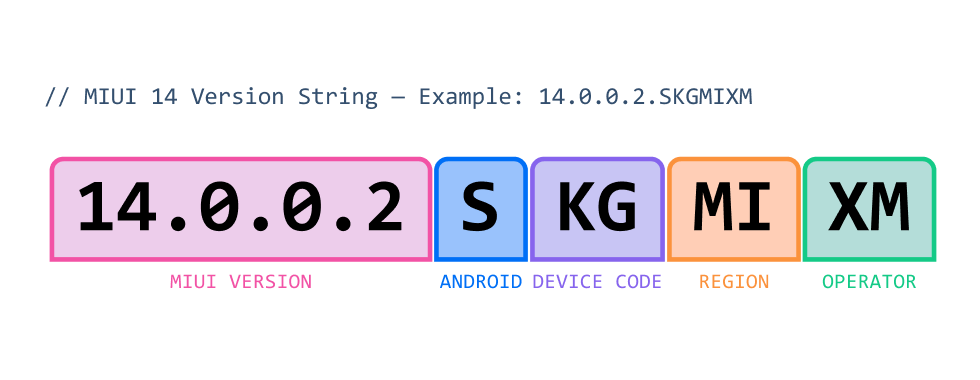
| 14.0.0.2 — Version Number | S — Android Base Version | KG — Device Model Code |
| First digits = MIUI major version (14 = MIUI 14). Third = minor. Fourth = patch/build. In HyperOS: 2.0.205.0 = HyperOS 2, minor 0, build 205. | Single letter encoding the Android version the ROM is built on: R = Android 11 · S = Android 12 · T = Android 13 · U = Android 14 · V = Android 15 (HyperOS 2 era). | Two-letter internal code for the specific device model. Each Xiaomi, Redmi, and POCO model gets a unique identifier used in ROM targeting and build infrastructure. |
| MI — Region Code | XM — Operator Lock | |
| Two-letter region: MI = Global · CN = China · EU = Europe EEA · IN = India · ID = Indonesia · TR = Turkey · TW = Taiwan · JP = Japan. | Two-letter carrier suffix. XM = not tied to a specific carrier. Carrier-branded devices carry the operator's own identifier here instead. |
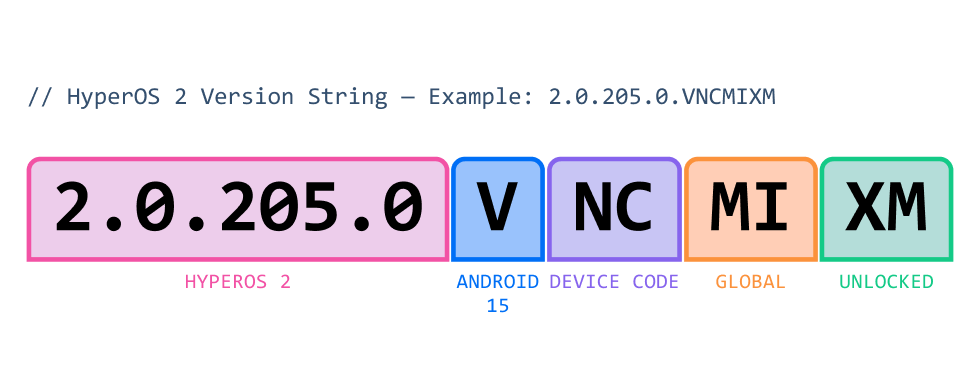
HyperOS 2 (released late 2024) uses the same suffix format as MIUI but prefixed with "2.x.x.x". Android letter advances: V = Android 15. The same hardware may run HyperOS in China and MIUI in global markets concurrently.
Xiaomi ROM Types — What to Use When
| ROM Type | File Format | How to write | Data Wipe? |
| Fastboot ROM | .tgz (contains .img files) | via Fastboot CLI / software tools | Yes - full |
| Recovery ROM | .zip | Built-in Updater or TWRP | Optional |
| OTA Package | .zip (delta) | Over-the-air (OTA) / automatic | No |
Anti-Rollback Warning — Xiaomi
Xiaomi devices since 2019 have implemented hardware anti-rollback protection (ARB). Writing firmware older than the device's current ARB level most likely bricks the device — including in EDL mode. Always verify target firmware is equal to or newer than installed before writing or perform the downgarade at your own risk. You can find a wide range of Xiaomi firmwares using the GivemeROM platform
Xiaomi Region Differences
| Region | Google Services | Notes |
| China (CN) | None | Chinese + English only. Uses MIUI CN or HyperOS CN. |
| Global (MI) | Full GMS | Standard for most markets. Broad language support. |
| Europe EEA (EU) | Full GMS + GDPR | Stricter privacy compliance. Reduced bloatware. |
| India (IN) | Full GMS | Localized apps and regional payment integrations. |
Huawei / EMUI / HarmonyOS — Full Breakdown
Huawei firmware follows a convention using a product model code, a hardware variant suffix, a numeric regional CUST code, and a sequential build version. Since the 2019 US trade restrictions, global Huawei devices run EMUI (AOSP-based, no Google services) while Chinese domestic devices run HarmonyOS. Both share the same underlying firmware structure and naming.
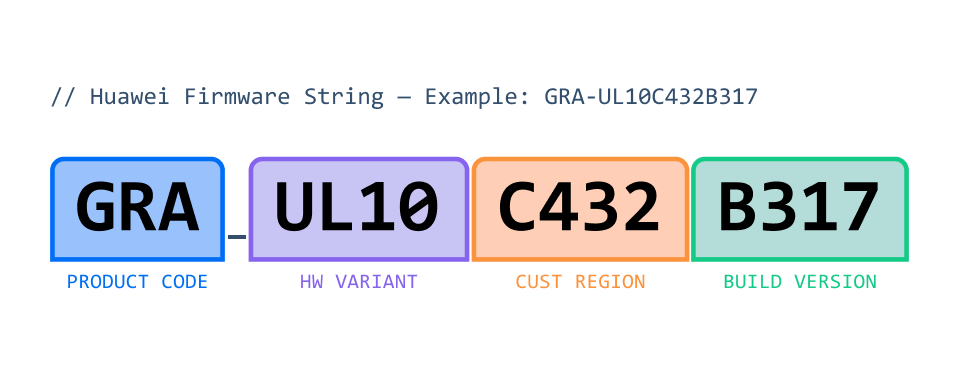
| GRA — Product / Model Code | UL10 — Hardware Variant |
| Short internal product identifier. GRA = P8 · EVA = P9 · VIE = P9 Plus · PRA = P8 Lite 2017 · ALE = P8 Lite · CLT = P20 Pro · NOH = P40 Pro · NTH = Mate 50 Pro. | Specifies hardware configuration: network bands, SIM slots, storage tier. L = LTE-capable. The number identifies the specific SKU (dual-SIM config, band support region). |
| C432 — CUST Region Code | B317 — Build Version |
| Numeric regional/carrier identifier. C00 = China · C432 = Europe · C185 = Middle East & Africa · C636 = Asia-Pacific · C900 = Global/Generic (no OTA) · C151 = India. | Sequential build number, incremented with each firmware release. B = "Build" prefix. Higher = newer. Cannot normally be downgraded. B571+ indicates Android Nougat-era or newer builds. |
Huawei CUST Region Codes — Reference
| CUST Code | Region / Carrier | OTA Available? |
| C00 | China (domestic, Google-free) | Yes — Huawei CN servers |
| C02 | Europe | Yes — carrier OTA |
| C185 | Middle East & Africa | Yes — Huawei MEA |
| C432 | Europe (open market) | Yes — Huawei EU |
| C636 | Asia-Pacific | Yes — Huawei APAC |
| C900 | Global / Generic | NO — manual only |
| C151 | India | Yes — Huawei IN |
| C341 | Japan | Yes — Huawei JP |
Critical: C900 Warning
Writing C900 (Global/Generic) firmware onto a device with a regional CUST (e.g., C432 Europe) permanently disables OTA updates. The device will always report "up to date." Restoring the original CUST requires writing OEM info — an advanced procedure requiring HiSuite or specialized tools like Sigma Plus, Octoplus Huawei Tool, ChimeraTool, or DT Pro Tool
HarmonyOS vs EMUI — Technician Reference
| Factor | EMUI (Global) | HarmonyOS (China) |
| Google Services | Not available (post-2019 models) | None — Huawei AppGallery ecosystem |
| Android Base | AOSP-compatible | HarmonyOS NEXT = independent kernel |
| Version as of July 2026 | EMUI 14 (= HarmonyOS 4 features) | HarmonyOS 4 / NEXT |
iPhone / iOS — Full Breakdown
iOS firmware ecosystem is fundamentally different from Android: it is fully closed, cryptographically signed per-device, and distributed exclusively through their servers. iOS firmware uses the .ipsw format (iPhone Software) and must be verified by the TSS (Tatsu Signing Server) before installation. There are no regional firmware variants — model-specific band and carrier differences are handled at the hardware level.
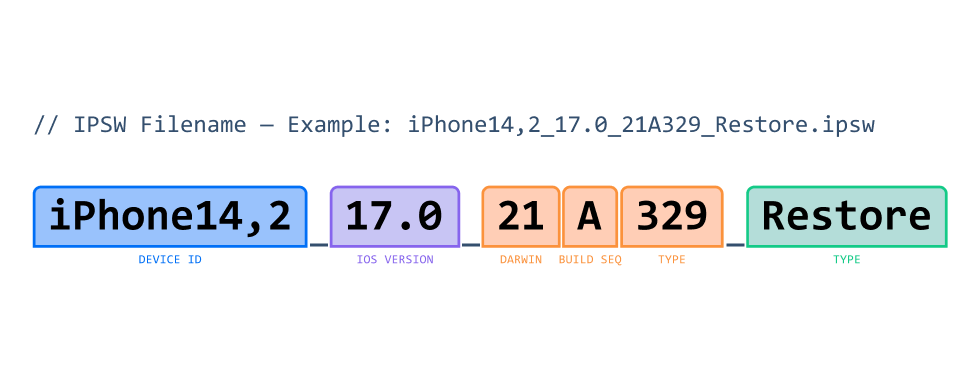
| iPhone14,2 — Internal Device ID | 17.0 — iOS Version | 21 — Darwin Version |
| Internal hardware model identifier. iPhone14,2 = iPhone 13 Pro. The number before the comma = hardware generation family; after the comma = SKU variant. Not the marketing name. | Human-readable version: Major (17) · Point release (0) · Patch (omitted if .0). iOS 17.3.1 = major 17, point 3, patch 1. Major aligns with the annual WWDC release cycle. | The underlying XNU/Darwin kernel lineage number. iOS 16 = Darwin 22 · iOS 17 = Darwin 23 · iOS 18 = Darwin 24. Rooted in the NeXTSTEP heritage starting from macOS X Cheetah (Darwin 5). |
| A — Minor Version Letter | 329 — Sequential Build Number | Restore — Firmware Type |
| Alphabetically increments for each point release: A = x.0 · B = x.1 · C = x.2 · D = x.2.1 patch branch. Letters may be skipped internally. Denotes which development branch produced the build. | Monotonically increasing build counter within the minor version branch. Higher = newer build iteration. A 4-digit number starting with 2 (e.g., 2329) indicates a device-specific build for new hardware. | "Restore" = full firmware for DFU/Recovery restore via Finder or iTunes. Replaces the entire device image. "OTA" packages (smaller .zip) are used for software updates without full restore. |
iPhone Internal Device ID Mapping — Recent Models
| Internal ID | Marketing Name | Chip | Year |
| iPhone15,2 | iPhone 14 Pro | A16 Bionic | 2022 |
| iPhone15,3 | iPhone 14 Pro Max | A16 Bionic | 2022 |
| iPhone16,1 | iPhone 15 | A16 Bionic | 2023 |
| iPhone16,2 | iPhone 15 Plus | A16 Bionic | 2023 |
| iPhone16,3 | iPhone 15 Pro | A17 Pro | 2023 |
| iPhone16,4 | iPhone 15 Pro Max | A17 Pro | 2023 |
| iPhone17,1 | iPhone 16 Pro | A18 Pro | 2024 |
| iPhone17,2 | iPhone 16 Pro Max | A18 Pro | 2024 |
| iPhone17,3 | iPhone 16 | A18 | 2024 |
| iPhone17,4 | iPhone 16 Plus | A18 | 2024 |
| iPhone17,5 | iPhone 16e | A18 | 2025 |
| iPhone18,3 | iPhone 17 | A19 | 2025 |
| iPhone18,1 | iPhone 17 Pro | A19 | 2025 |
| iPhone18,2 | iPhone 17 Pro Max | A19 | 2025 |
| iPhone18,4 | iPhone Air | A19 | 2025 |
| iPhone18,5 | iPhone 17e | A19 | 2025 |
iOS Signing Status — Critical for Repair
| Signed Firmware | Unsigned Firmware | SHSH2 Blobs |
| Apple's TSS server currently accepts SHSH blobs for this version. Restores possible via Finder/iTunes or 3uTools. Signing windows typically stay open 2–4 weeks after a new release. [Restorable] |
TSS server rejects the SHSH for this version. Cannot be installed through official channels. Requires pre-saved SHSH2 blobs plus a bootrom exploit (checkm8 covers A5–A11 chips only).
[Blocked] |
Cryptographic signatures tied to a specific device ECID + firmware version. Must be saved while signed. Tools: TSSChecker, TSSSaver, Titan. Required for any downgrade attempt. [Save Now] |
DFU vs Recovery Mode
Recovery Mode (iBoot visible): Device is partially booted via iBoot. Use for standard restores. Firmware must be Apple-signed.
DFU Mode: Deepest restore mode. Still requires Apple signing on modern devices (A12+) without a hardware bootrom exploit. But some older models are supported through QianLi programmer.
Before Doing Anything - Checklist
- Identify exact model number, hardware variant, (for iPhone check iCloud, lost status etc. using iRemove Info service)
- Record current firmware version and binary/ARB level
- Confirm target firmware binary/ARB level is equal to or higher than current
- Match region/CUST/CSC code exactly to avoid OTA loss
- Back up IMEI/EFS partition (Samsung/Huawei) or SHSH2 blobs (iOS)
- Charge device to at minimum 50% or keep on AC power throughout the operation
- Verify firmware MD5 or SHA256 checksum before initiating the operation
Disclaimer
This website is an informational resource designed exclusively for professional mobile device service engineers, repair technicians, and authorized service centers. All content is intended for legitimate software-level phone servicing, including device refurbishment, carrier compliance operations, and authorized repair workflows. This site does not support, endorse, or describe any illegal practices, including but not limited to: processing stolen or illegally obtained devices, circumventing security measures for unauthorized access, or any activity that violates applicable laws. Users are solely responsible for ensuring compliance with all applicable laws and regulations in their jurisdiction.
