One year online activation for Easy-Draw Tool.
Easy-Draw Tool gives access to diagrams for different devices. Does not require any dongles. Can be used on five PCs, but simultaneously works on one PC only.
To activate Easy-Draw Tool follow these steps:
- Download Easy-Draw software
- Create user account
- Provide your username while placing the order
Features:
- Simultaneous check of bitmap and schematic diagram
- Fully English interface
Easy-Draw Tool contains:
- Bitmaps for:
- iPhone: 7P/7/6SP/6S/6/6P/5S/5/5C/4/4S/SE
- iPad: 2/3/4/Air/Air2/Mini/Mini2/Mini3/Mini4
- Samsung: N3-N9006, N3-N9009, N4-N9109W, S4-I9500, S4-I9505, S5-G9009D, S5-G900F, S6-G9200, W2014, W2015, W2016
- Xiaomi: MI3-TD, MI4-TD
- Schematic diagrams for:
- iPhone: 7P/7/6SP/6S/6P/6/5S/5/4S
- iPad: 2/3/4/Air/Mini1/Mini2
- Samsung: A3009, A7000, A7009, E7000, E7009, G9250, N9200, A5000, G900V, G9260, G9200, N7100, I809, I5508, I5800, I8250, I699, I5500, I9505, I9001, I9008L, I9018, I9023, I9050, I9070, I9088, I6320, I9300, I9500, I509, I659, I909, I1862, I1800, B9062, B9120, A5000, N3-N9006, N3-N9009, N4-N9109W, S4-I9500, S4-I9505, S5-G9009D, S5-G900F, S6-G9200, W2014, W2015, W2016
- Xiaomi: MI3, MI4, MI4S, MI5, MI5S PLUS
- Huawei: C8815, G9ALOOCLOO, G520, G610, H300-T00, KIW-X5, MATE7-CL00, MATE8, MATECRR-CLOO, P6MI-ONE_PLUS, P7, P8-CL10, P8-TL00, P8-UL10, P9, P9 PLUS, T2211, Y600, enjoy6S, Honor3C, Honor4A, Honor4X, Honor6H60-L01, Honor6H60-L02, Honor6H60-L03, Honor6H60-L04
- Gionee: A66, A320, A350, E3, E6mini, E6T, E7, E7L, E7mini, E7T, E8, F100, F103S, F105, F301, F303, GN100, GN105, GN137, GN200, GN305, GN5001S, M3, M3S, M5, M5PLUS, M6, M2017, N8, Q1, S5, S5.1, S5.5, S5.5L, S6, S7, S8, S600, V3, V6, V8, V183, V185, V187, V188, V188S, W800, W808, W900, W900S, W909, Z201, MITO M4, MITO M6
- Meizu: MX2
- Lenovo: A1900, K30-T, A7-10, A7-20, A7-30, A10-80HC, A60, A298T, A310, A366T, A678T, A790e, A800, A820, A830, A858, A938T, A2800, A2860, A3500, A3580, A3600, A3600U, A3800, A3860, ET860, G828, K7mini, P50, S2-38ATO, S680, S868T, TD10
- Position diagrams for:
- iPhone: 7/6SP/6S/6P/6/5S/5/4S
- iPad: 2/3/4/Air/Mini1/Mini2
- Samsung: A3009, A7000, A7009, E7000, E7009, G9250, N9200, A5000, G900V, G9260, G9200, N7100, I809, I5508, I5800, I8250, I699, I5500, I9505, I9001, I9008L, I9018, I9023, I9050, I9070, I9088, I6320, I9300, I9500, I509, I659, I909, I1862, I1800, B9062, B9120, A5000, N3-N9006, N3-N9009, N4-N9109W, S4-I9500, S4-I9505, S5-G9009D, S5-G900F, S6-G9200, W2014, W2015, W2016
- Huawei: Honor3C
- Vivo: E5, S3, S6, X5L, X6D, Y22T
- Lenovo: A1900, K30-T, A7-10, A7-20, A7-30, A10-80HC, A60, A310, A366T, A678T, A790e, A800, A820, A830, A858, A938T, A2800, A2860, A3500, A3580, A3600, A3600U, A3800, A3860, ET860, G828, K7mini, P50, S2-38ATO, S680, S868T, TD10
- Fault diagrams for:
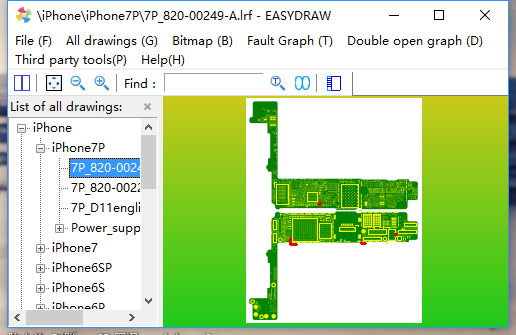
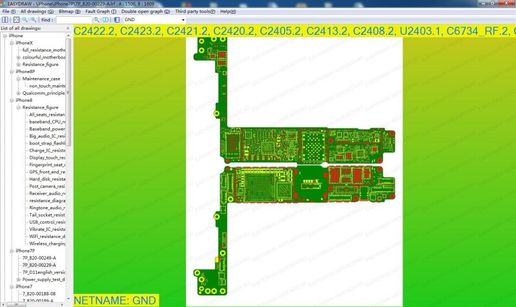
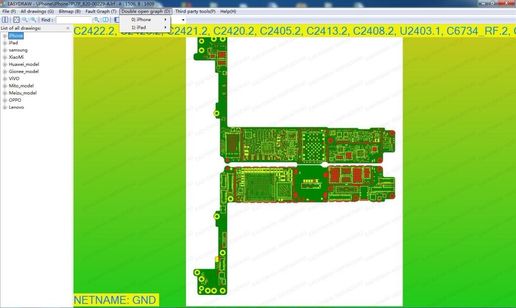
* The developer provides support only for those phones which are on the list of supported. Not all servicing features can be applied to some supported models, due to differences of hardware/software versions.
Detailed information on the further use of the digital product will be sent to your email, specified during registration, when we confirm your payment and process your order.
Product specifications, appearance and package content may differ from those presented on the website and can be changed without notice. Please, contact sales manager before purchase.
All rights reserved. This material from gsmserver.com web site may not be published, rewritten or redistributed in whole or part without authorship indicated and backlinks provided.